
Our CryptoBilis investigation: what we found and what we’ve changed

Summary
This is an update on our investigation into the hardware implant reported in a Trezor Safe 5 bought from the reseller CryptoBilis. On 11 November we released a firmware update that stops the implants we’ve found from capturing anything, making the current batch useless. We have also cut our reseller network by about 80%, and every remaining reseller will have to follow much stricter rules. Our investigation so far shows the implants are limited to Trezor Safe 5 devices bought from CryptoBilis between August and September 2026: we’ve found none in devices from any other reseller, or in any other Trezor model.
No customer has reported losing funds, and our guidance for CryptoBilis buyers hasn’t changed.
After the reports about CryptoBilis in October, we asked customers who bought a Trezor there to contact us. So far 48 have, and we’re checking their devices in our lab or from photos of the internals. We’ve also checked devices from our other resellers in the region and found no evidence of tampering.
What we found
Across the devices we’ve checked, three Trezor Safe 5s bought from CryptoBilis contain the implant, including the one reported to us in October. Our lab has examined that device, and the other two were identified from photos sent by their owners. All three were bought between 20 August and 23 September 2026, through CryptoBilis’s Tokopedia and Shopee stores and directly from CryptoBilis. None of their owners has lost funds. Every other device we’ve checked showed no evidence of tampering.
What we've changed
Devices: Our latest firmware update 2.13.1, released on November 11th, includes a protection that stops the implants we’ve found from capturing anything on devices that run it, making the current batch of implants useless. If you bought from CryptoBilis, you should still move your funds to a new wallet with a new seed, because the update can’t protect a wallet backup that was captured before it.
Resellers: We have cut our reseller network by about 80%. The partners we removed were trustworthy and posed no immediate threat, but they didn’t fit the much stricter processes every remaining reseller will now have to follow to protect the supply chain. The list of measures is long including how devices are sourced, stored and who has access to them.
How the implant works
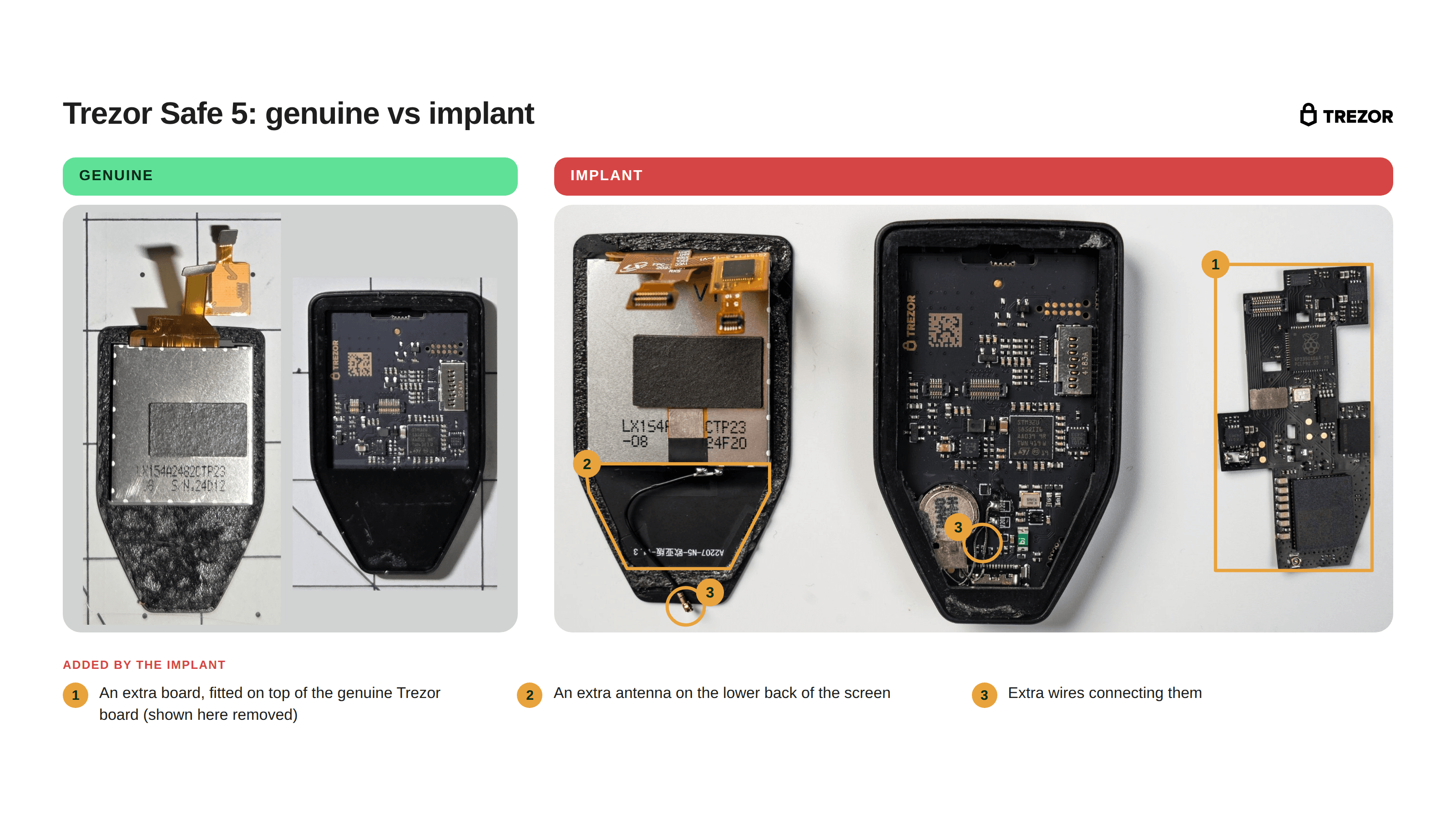
Our embedded team has extracted and analyzed the firmware from the implant in the reported Trezor Safe 5. The implant is an extra circuit board fitted between the Trezor Safe 5’s main board and its screen. It only listens: it copies everything shown on the screen, including what you type on the device, and never changes anything on the device itself, including the firmware and Secure Element. Whenever recovery words appear on the screen, the implant recognizes and stores them. That includes the words the device shows when it creates a wallet backup, and the words you type when you recover an existing wallet onto the device. It does the same with a passphrase if one appears on the screen. It encrypts what it captures and sends it over the mobile network to a server controlled by the attackers. If it can’t connect, it keeps the data and tries again until it succeeds. It works the same way as the implants found in Ledger devices, adapted to the Trezor Safe 5’s display.
What it looks like
What CryptoBilis customers should do
Your replacement
Any customer who bought a Trezor from CryptoBilis from March 2026 onwards is eligible for a new Trezor device. Shipping rules mean we can’t deliver every model to every country, so in some cases we’ll offer a different model and refund the price difference, delivery to an address in another country, or a refund. Please keep your CryptoBilis device and contact Trezor Support to arrange this.
If you bought your Trezor elsewhere
We have no confirmed cases outside CryptoBilis. If you’re not sure where your device came from, contact Trezor Support. When you buy your next Trezor, we recommend buying directly from trezor.io.
How to report a suspicious device
If you think your Trezor may have been tampered with, contact Trezor Support at https://trezor.io/support. Keep the device, and don’t set it up or use it until we’ve told you what to do next.
If you’re a security researcher with technical findings, please report them by emailing [email protected]. Our security team will verify your report and coordinate disclosure with you, and for sensitive cases we can set up an encrypted channel.
Thank you to everyone who has reported a device or sent us photos. Your reports have helped us understand this attack and protect other customers. The customer who first reported the implant will be rewarded for their help with this investigation.
Stay alert to scams: Never share your recovery phrase with anyone. Trezor will never ask for it. Scammers may pose as Trezor and offer replacements or refunds, so only deal with us through https://trezor.io/support
What happens next
We’re working with SEAL 911, the Security Alliance’s emergency response service to help protect customers, their funds and their devices. We won’t publish technical details that could help attackers or put affected customers at risk.
We’re still investigating, and we’ll update this post if anything changes, including:
- Any confirmed implant in a device not bought from CryptoBilis, or in a Trezor model other than the Safe 5
- Any report of lost funds linked to these implants
- New protections for our devices, once they’re released
Each update will be dated and added to the top of this post, and we’ll share it in our existing thread on X. If you have questions in the meantime, contact Trezor Support.