Entropy check: how Trezor Suite verifies wallet generation
When you set up your Trezor, entropy check verifies that the device follows the documented wallet-generation process and uses the entropy supplied by Trezor Suite.
This article explains how that verification works. For an overview of how Trezor generates wallets and where each entropy contribution comes from, see What is entropy and how does Trezor generate your wallet?.
Entropy check runs automatically during wallet setup in Trezor Suite. It requires firmware 2.8.7 or later on Trezor Safe 3, Safe 5 and Model T, or 1.13.1 or later on Model One. Trezor Safe 7 supports it on all released firmware versions.
What entropy check protects against
A fake or tampered device can produce a wallet that looks normal but is predictable to an attacker. The attacker could then recreate your wallet and take your funds.
Devices like this may ignore the entropy supplied by Trezor Suite and generate a wallet that is predictable to an attacker. Entropy check is designed to detect this behavior.
To reduce the risk of receiving a tampered device in the first place, buy from the official Trezor store or from an authorized reseller.
How entropy check works
During setup, Trezor Suite asks your Trezor device to generate several candidate wallets. The device discards the candidates selected for checking, and Suite reconstructs them for verification. A final candidate is kept as your wallet.
1. Commitment
Before Trezor Suite sends its entropy, the Trezor device commits to its own contribution. That commitment stops the device from changing its value after it sees what Suite sent.
2. Candidate creation
Trezor Suite sends its entropy contribution. The device combines it with the contribution it committed to earlier and derives a candidate wallet.
3. Reading the candidate fingerprint
Trezor Suite asks the device for XPUBs (extended public keys) on selected derivation paths. These act as a fingerprint for the candidate wallet and expose no private keys.
4. Reveal and verification
After a candidate has been rejected and will not be retained as your wallet, the Trezor device reveals the entropy it contributed. Trezor Suite then:
- Checks the revealed value against the earlier commitment
- Combines it with the entropy Suite sent
- Rebuilds the candidate wallet on your computer
- Derives the expected XPUBs and compares them with the ones the device reported
If the XPUBs match, Suite has verified that this discarded candidate was derived from the committed device contribution and Suite's contribution, following the documented process.
Randomized checks
Suite repeats this process a randomly chosen number of times.
Your device cannot know in advance which candidate will be the one you keep. A device that behaves correctly only during the checked rounds has to guess, which creates a risk of being caught.
Final wallet is retained
The final candidate becomes your wallet. Its device entropy is not revealed during the entropy check flow, so Suite cannot rebuild it the way it rebuilt the discarded candidates.
What happens if entropy check fails
If a check fails, Trezor Suite stops the setup process and shows a warning that the device may be compromised.
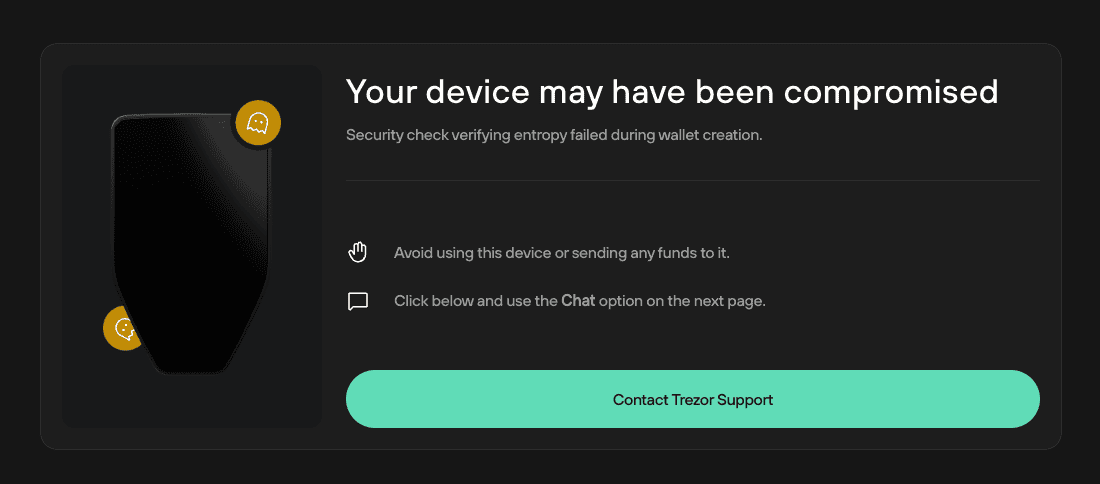
If you see this screen, stop using this Trezor device. Contact Trezor Support right away, using the button on this screen or through Chatbot Hal.
Possible causes include a counterfeit or compromised device, faulty hardware, or a firmware or Suite defect.