Bitte beachten: Unsere Artikel sind derzeit nur auf Englisch verfügbar.
Polygon: what it is and how it works with Trezor
What is Polygon (POL)?
Polygon, formerly Matic Network, is a framework for building and connecting blockchain projects on Ethereum. Polygon aims to address some of the challenges associated with Ethereum scalability—namely high gas fees and slow transaction times—by managing transactions on a separate Ethereum Virtual Machine (EVM)-compatible blockchain.
Polygon proof-of-stake network
Trezor Suite works with the Polygon proof-of-stake network, commonly referred to as Polygon PoS. This network was originally launched as the Matic Network in June 2020. Polygon PoS uses a proof-of-stake (PoS) consensus mechanism for processing transactions, and its native token is POL.
If you trade tokens outside the Polygon PoS network, you may not be able to access them.
Some key components and features of the Polygon network include:
The POL token (an ERC20 token on Ethereum) serves various roles in the Polygon ecosystem including as the native token of the Polygon PoS network.
It ensures scalability, security, and sustainability of the Polygon ecosystem, serving various on-chain operations in a faster and more affordable way than Ethereum.
The upgrade from MATIC to POL was implemented under Polygon Improvement Proposal 18 (PIP-18).
Layer 2 scaling: Layer 2 refers to a network that sits ‘on top’ of the main Layer 1 blockchain. Layer 2 solutions aim to solve scalability issues of the underlying network by processing transactions using sidechains. In the case of Polygon, it aims to reduce the burden on the main Ethereum chain.
Interoperability: Polygon supports a multi-chain Ethereum ecosystem. It enables different blockchains to interact with each other, facilitating the transfer of assets and information across various platforms. This is crucial for a seamless user experience and for enabling complex use cases across the blockchain space.
Aggregation of blockchains: Polygon supports a multi-chain Ethereum ecosystem. It enables different blockchains to interact with each other, facilitating the transfer of assets and information across various platforms. This is crucial for a seamless user experience and for enabling complex use cases across the blockchain space.
Proof-of-stake: Polygon utilizes a proof-of-stake (PoS) consensus mechanism to help secure the network and distribute new POL. Polygon’s consensus mechanism is meant to allow for faster and more cost-effective transactions than those made on Ethereum. This means you can earn additional POL tokens by staking your existing POL tokens.
Bridging: Blockchain bridges connect separate networks, enabling you to move tokens between networks. This means you can bridge some crypto between various Polygon aggregation layer-supported blockchains and the main Ethereum blockchain. Keep in mind that only the Ethereum and Polygon PoS blockchains can be accessed through Trezor Suite.
Using Polygon (POL) with Trezor
POL is the native token of the Polygon PoS chain; this is natively supported in Trezor Suite. If you are using POL token on other Polygon-associated blockchains unsupported in Trezor Suite like Polygon zkEVM, you will need to use your Trezor hardware wallet with a third party application.
Trading POL is safer and easier than ever thanks to its native support in Trezor Suite. With your device set up, you just need to follow a few quick steps to get started:
- Open the Trezor Suite desktop application (alternatively you can use the web version of Trezor Suite).
- Connect and unlock your Trezor device.
- Click the plus [+] sign in the left panel:

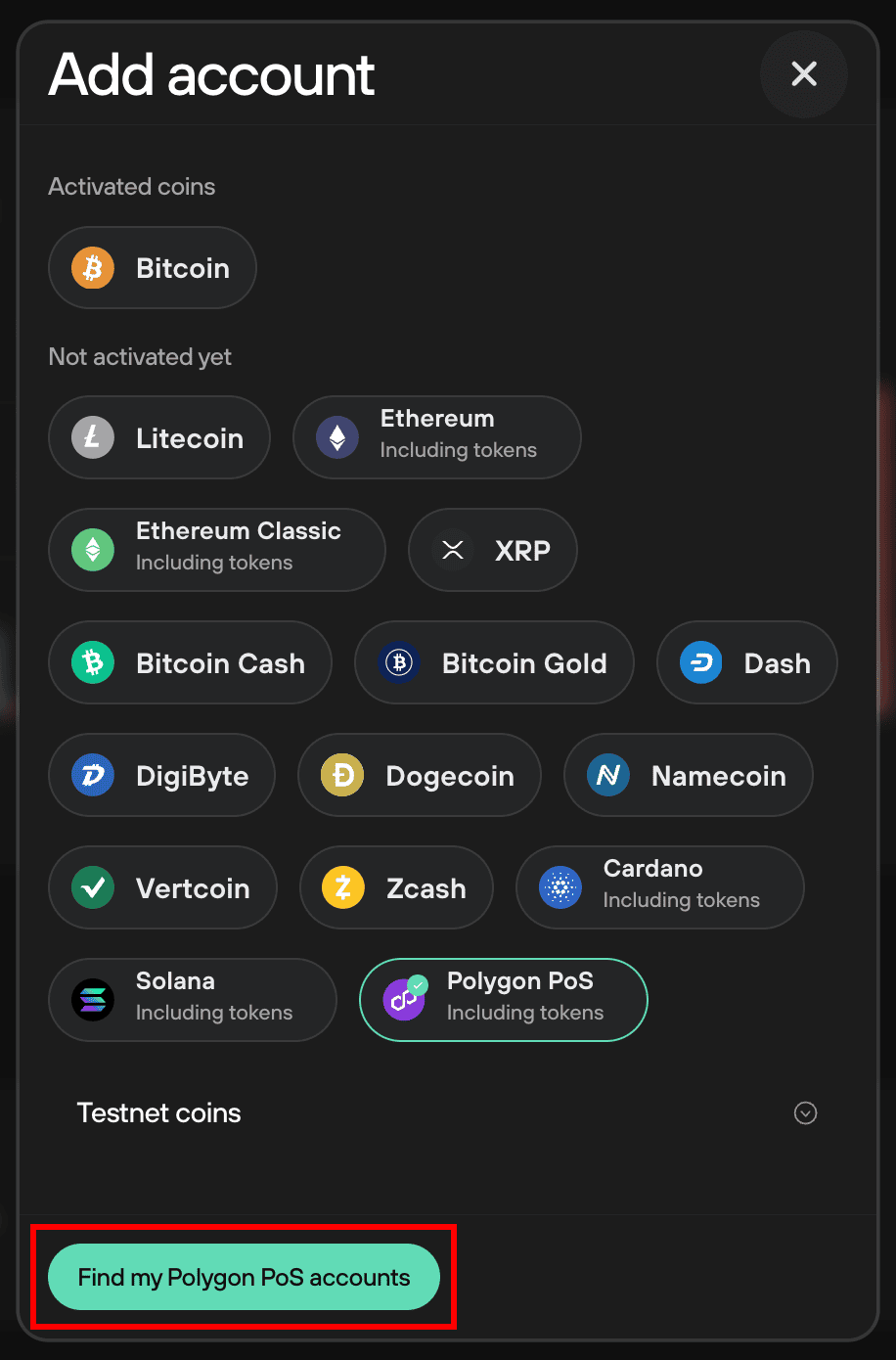
- Then select Polygon PoS and click on Find my Polygon PoS accounts:
- That's it, you're good to go! You'll be automatically redirected to the account Overview, where you can get started immediately with receiving, buying and trading POL:
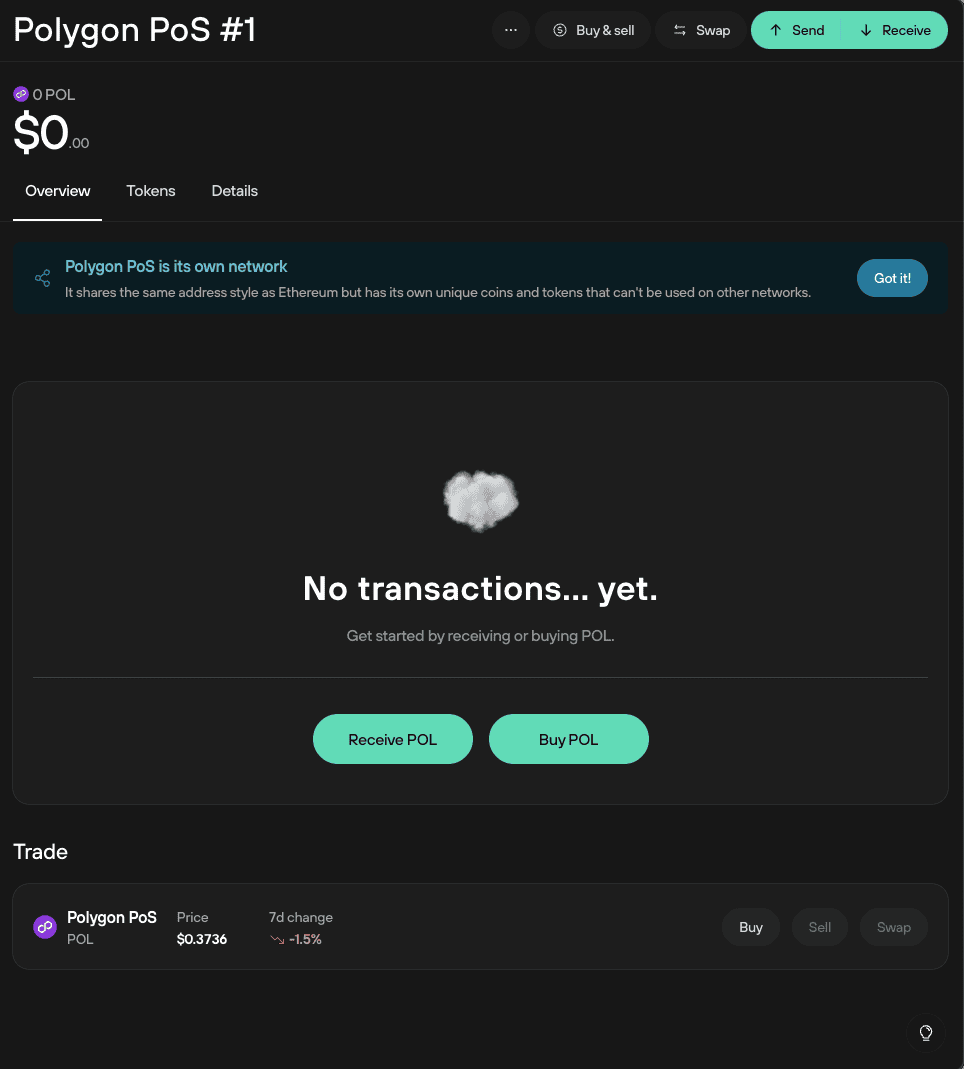
To get started with POL, you can:
- Click on Receive POL, then verify your POL receiving address using your Trezor. Once verified, you can either Copy the address or use the QR code for receiving funds.
- Click on Buy POL and follow the general process outlined in our Buy crypto in Trezor Suite article.
Remember to select the Polygon PoS network, otherwise you may have trouble accessing your POL.
Migrating from MATIC to POL token
On September 4, 2024, the original Polygon (MATIC) token was upgraded to Polygon Ecosystem Token (POL). Learn in this section how this change affects Trezor users of Polygon, and whether you need to take any steps to participate in the upgrading process.
What is this change?
Holders of MATIC are being asked to migrate to POL with a 1 ratio being honored in exchanges between the two tokens (i.e., one MATIC token is equivalent to one POL token).
The Polygon Ecosystem Token (POL) introduction and upgrade from MATIC represents a significant change for Polygon and its capabilities. This upgrade introduced POL as the new native token of Polygon’s aggregated blockchain network, which aims to expand Ethereum's scalability through multiple Polygon Layer 2 chains. POL retains many of the same features as MATIC, and supports EIP-2612 for signature-based permit approvals.
Why does it matter to me as a Trezor user?
The POL upgrade affects Trezor users holding MATIC in self-custody on their Trezor. If you are holding MATIC on your Trezor wallet, this change directly affects how your assets remain secure and accessible in self-custody on your Trezor when transitioning from MATIC to POL. This upgrade may require you as a user to actively participate in the migration process. This is why it is always important to be aware of managing any digital assets you hold on your Trezor securely and independently.
POL migration effects on Trezor Suite
If you use Trezor Suite to see your MATIC on Trezor it is viewable either in the tokens section of your Ethereum account or the main (native token) balance of your Polygon PoS account.
FAQs
How do I add Polygon (POL) to my hardware wallet?
You can buy POL directly in Trezor Suite. Follow the steps above to enable the token and use our general guidance for Receiving or Buying crypto.
How do I send POL using my hardware wallet?
Follow the steps in our Sending crypto article. Be sure to send POL only through the Polygon PoS network.
How do I stake POL?
To stake POL, use your Trezor with a third party app such as MetaMask.
Are there any differences in speed and transaction fees compared to Ethereum?
Yes. Polygon is a scaling solution ("sidechain") designed to offer faster and cheaper transactions than Ethereum.
What tokens are on Polygon?
You can explore a list of tokens on the polygonscan website, which includes over 800 token contracts.