Importante: los artículos de nuestro blog de momento solo están disponibles en inglés.

10 Common FAQs around passphrases in Trezor hardware wallets

A passphrase adds an extra layer of protection to your Trezor hardware wallet by creating a separate passphrase wallet tied to your wallet backup. Even if someone gets access to your wallet backup, they cannot access your funds without the correct passphrase. However, if you forget your passphrase, the associated wallet cannot be recovered, so use this feature only if you are confident in managing it securely!
Passphrases are a powerful feature in Trezor Suite that add an extra layer of security to your cryptocurrency. However, passphrases are often considered an advanced feature because they require careful handling — if forgotten, there is no way to recover the funds linked to that passphrase. Since the passphrase is never stored on your Trezor hardware wallet, this makes it a tool for users who are confident in managing their own security.
If you’re using a Trezor hardware wallet or thinking about adding a passphrase to your crypto security routine, you probably have a few questions. In this post, we’ll break down the most common FAQs around passphrases to help you understand how they work and why they’re so important.
1. What is a passphrase and how does it work?
A passphrase is an additional layer of security for your Trezor wallet, granting access to a separate wallet beyond your standard wallet. Think of it as a secret key that unlocks a new “locker” within your wallet, where you can securely store the bulk of your crypto.
You can create and access as many wallets as you’d like by using different passphrases. Without the passphrase, you’ll only see your standard wallet. But with the right passphrase, you’ll unlock the specific wallet associated with it.
In essence,
**Wallet backup = Standard wallet **
**Wallet backup + passphrase = (Hidden) passphrase wallet ** Here’s what you need to know:
- A passphrase functions like an extra word added to your wallet backup (wallet backup)
- Using your wallet backup alone grants access to your standard wallet
- Each unique combination of ‘backup + passphrase’ grants access to a corresponding unique passphrase wallet.
2. Is the passphrase only a Trezor feature? Can I access my passphrase wallet with third-party apps like MetaMask?
Passphrases are not exclusive to Trezor. They work with many third-party apps, including MetaMask. The same combination of your wallet backup and passphrase will derive the same wallet with identical addresses, no matter which application you use.
3. If my wallet backup (wallet backup) is compromised, will the passphrase still protect my coins?
Yes!
Yes! A passphrase adds an extra layer of security even if your wallet backup is compromised. Since the passphrase is not stored on your Trezor hardware wallet, your accounts remain protected. Without the specific passphrase, nobody can access the (hidden) passphrase wallets you’ve created.
4. What if I lose my Trezor hardware wallet? Can I still access my funds?
Absolutely! If you lose your Trezor hardware wallet, you can simply:
- Buy a new one
- Import your wallet backup
- Enable the passphrase feature
- Enter the exact same passphrase you used before
This will give you access to your hidden wallet and your crypto, just as it was on the previous device.
**Remember: **
- To access a passphrase wallet, you must enter the passphrase with 100% accuracy
- If you enter anything else, a brand new passphrase wallet will be created
- If you forget your passphrase, the associated wallet is irretrievable
5. Is the passphrase something Trezor generates for me?
No, Trezor does not generate the passphrase for you. Unlike the wallet backup, which is automatically generated, the passphrase is something you create yourself. It can be any combination of characters, a word, or even a sentence up to 50 characters long.
This is why it’s considered an advanced feature — it’s your responsibility to choose and remember your passphrase. If forgotten, there’s no way to recover the funds associated with that passphrase.
Essentials to know when selecting a passphrase,
- It can be any memorable word / phrase / sentence up to 50 bytes (about 50 ASCII characters)
- It is case sensitive i.e. “Hello World” is not the same as “Hello world”
- Spaces are valid characters — every character matters
6. How should I store my passphrase?
Your passphrase should be memorable. It’s recommended not to write it down to avoid the risk of it being discovered. However, if you do choose to store it physically, follow the same rules as for your recovery seed: avoid digital storage and keep it in a secure location. More importantly, keep it separate from your wallet backup.
A good approach is to store it among personal items where trusted relatives can find it and recognize its importance, without it being in an obvious spot for a thief. For added security, consider alternatives like a safe deposit box or sharing it with a trusted person, such as a spouse or attorney.
7. Where is a passphrase stored? Can someone extract my passphrase from Trezor?
No, the passphrase is never stored on your Trezor hardware wallet. When you enter a passphrase, it is used to derive the hidden wallet, but it is not saved anywhere on the hardware wallet or within the software. This ensures that even if someone gets physical access to your Trezor, they cannot extract the passphrase.
8. What happens if I forget my passphrase?
If you forget your passphrase, you lose access to the hidden wallet associated with it permanently. There is no way to recover the passphrase, and neither Trezor nor any other entity can retrieve the funds. This is why the passphrase is considered an advanced feature for self-custody — it’s a powerful tool for securing your assets, but it comes with the responsibility of securing and remembering it yourself.
9. Should I share my passphrase with anyone?
In general, your passphrase should be treated just like your wallet backup (recovery seed) — never share it with anyone unless absolutely necessary. Sharing it gives full access to the wallet and funds associated with that passphrase.
If you’re planning for inheritance or want to ensure your loved ones can access your funds in case of an emergency, it’s important to share it with a trusted individual. Make sure it’s stored securely and only accessible to those you fully trust to avoid any potential misuse.
10. Can I use a simple passphrase like “password” or “12345”?
While you can technically use any combination of characters as a passphrase, it is highly discouraged to use simple or easily guessable phrases like “password” or “12345.” These make your passphrase wallet vulnerable. Instead, choose a unique, complex passphrase that is both secure and memorable to you. Using a combination of upper and lowercase letters, spaces, and special characters can further increase the strength of your passphrase.
Remember, a passphrase is case-sensitive, so “Hello World” is not the same as “hello world.” A case in point is below:
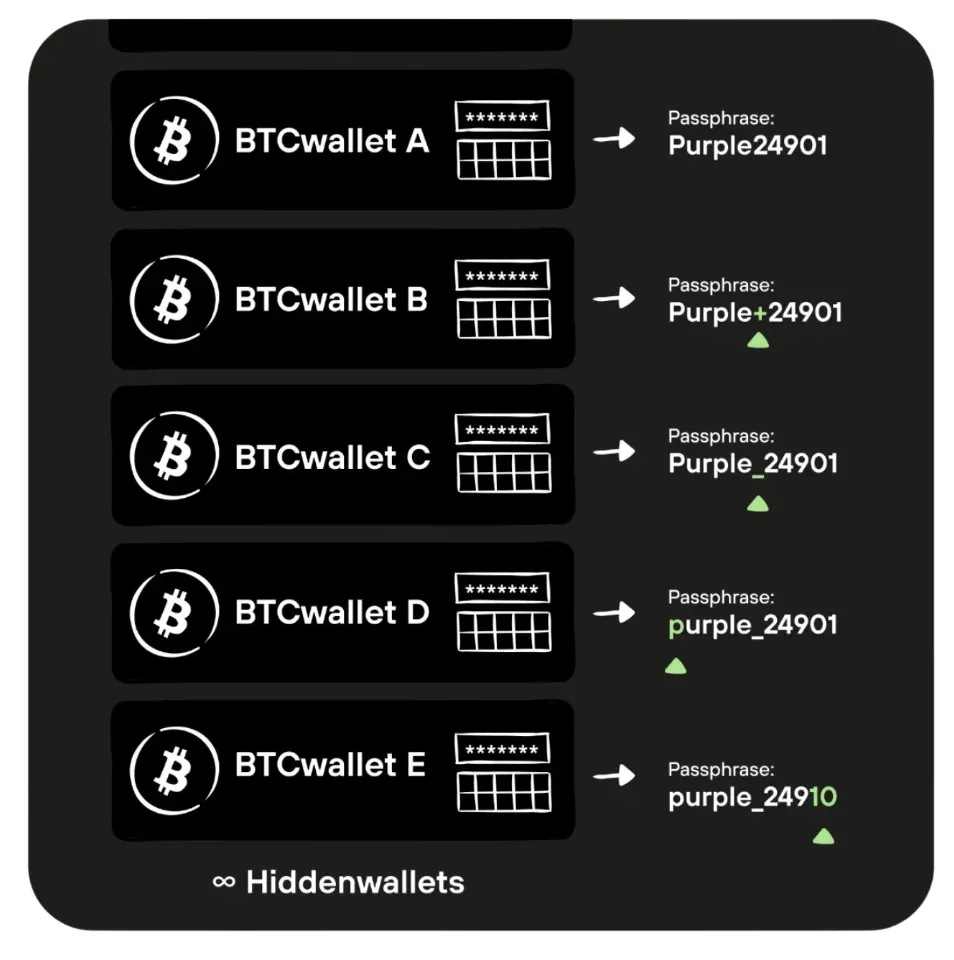
In this schematic, wallets “A” through “E” are all unique passphrase-protected hidden wallets; the (minor) differences between each separate, valid passphrase are highlighted in green.
Conclusion
A passphrase is a powerful tool for those looking to add extra layers of security to their crypto. It helps to protect your accounts from unauthorized access. However, since it is never stored on your hardware wallet and cannot be recovered if lost, it’s considered an advanced feature. Always make sure your passphrase is both memorable and securely stored.